Backtester or journal? Why a strategy needs both
A backtester tells you what a strategy would have done. A journal tells you what you actually did. One without the other leaves holes. Here is a five-step loop that closes them.
Read →Manual replay or automated rules, free or premium, forex or futures: ten backtesting tools compared honestly, with who each one is for and what it costs.
 By Wickform Team8 min read
We make Wickform, which is on this list. We've tried to be fair: every tool below is the right pick for someone, and we say where Wickform isn't. Prices are in US dollars, checked on 19 November 2026 on each company's own site where it showed them; they change often, so check before you buy.
There are two kinds of backtesting, and a good list needs both. Manual (replay) backtesting hides the future and makes you trade the chart one bar at a time, which tests a discretionary strategy and your execution together. Automated backtesting runs exact rules over years of data in seconds, which is faster but only works for strategies a computer can follow. We looked at what each tool tests, which markets it covers, where the data comes from, whether it journals the trades, and what it costs to start.
| Tool | Best for | Style | Starts at |
|---|---|---|---|
| FX Replay | Replay across forex, futures and crypto with data included | Manual | Free plan |
| Wickform | Prop futures traders who want replay and a journal in one | Manual | Free plan |
| TradeZella | Backtesting inside a full-featured journal | Manual + AI | $35 / month |
| TraderSync | Replay with tape and Level II on higher plans | Manual + automated | $29.95 / month |
| Forex Tester | Tick-level forex replay | Manual | Paid, free demo |
| TradingView | Your first bar replay, and Pine Script strategies | Manual + automated | Free plan |
| NinjaTrader | Coding and testing futures strategies for free | Automated + replay | Free to backtest |
| TrendSpider | No-code automated strategy tests | Automated | Premium plans |
| MetaTrader 5 | Forex and CFD expert advisors | Automated | Free |
| QuantConnect | Python and C# quant research | Automated | Free plan |
FX Replay is a browser-based replay platform built for manual backtesting. You pick a market and a date, the future stays hidden, and you place trades as the chart moves forward, with an analytics dashboard and journal around your sessions. Higher plans add seconds-level data and futures data from CME.
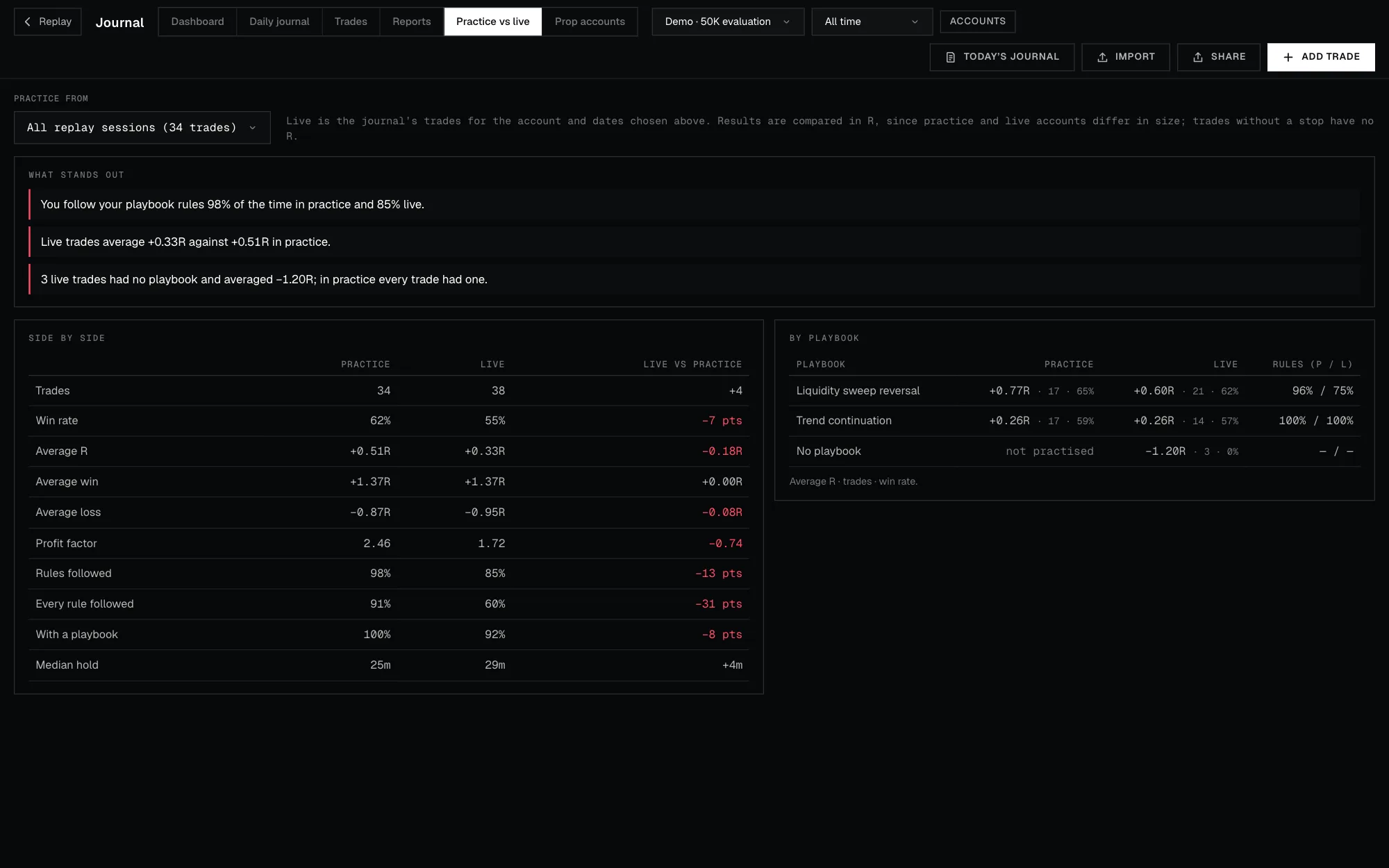
Wickform is a trading journal for prop futures traders with bar replay built in. You journal your live trades (imported from Tradovate, NinjaTrader, Rithmic, TopstepX, Interactive Brokers, MetaTrader 5 or a CSV), and you practise the fixes on replay with stops, targets, partial exits, breakeven and trailing stops. Practice and live results sit side by side, and every replay trade is journaled with your playbook, grade and screenshots. Daily blind drills hide the date to cut hindsight.
TradeZella is best known as a trading journal, and its plans include manual backtesting on 1-second charts with unlimited sessions. Higher plans add automated AI backtesting runs and trade replay of your real trades. If you already journal in TradeZella, it keeps practice and live trades in one place.
TraderSync pairs a journal with Market Replay across stocks, futures, crypto and forex. Precision goes from 1-minute bars on Pro to 1-second and 250-millisecond ticks on higher plans, with time & sales and Level II for scalpers who read the tape. It also offers automated backtesting and an AI assistant.
Forex Tester has been around for years as a dedicated backtesting simulator, now with an online version. It's known for its historical tick data, which makes fills on short timeframes more realistic, and it covers forex, stocks, crypto and futures.
Most traders first rewind a chart with TradingView's Bar Replay. It's built into the charts you may already use, and Pine Script lets you code a strategy and see its results in the Strategy Tester. It's a great start, but it doesn't keep statistics on manual replay trades or journal them for you.
NinjaTrader is a futures trading platform whose Strategy Analyzer backtests and optimises coded strategies (NinjaScript, C#) and point-and-click strategies from its Strategy Builder. Market Replay plays back recorded market data so you can practise manually. Backtesting is free; you pay when you trade live.
TrendSpider is an analysis platform with a point-and-click Strategy Tester. You set entry and exit conditions and it runs them over historical data, reporting win rate, profit factor and drawdown. It also automates trendlines, patterns, scanners, alerts and bots. We compared it with Wickform in TrendSpider vs Wickform.
MetaTrader 5's built-in Strategy Tester runs and optimises expert advisors (trading robots written in MQL5) on your broker's history, with multi-currency testing and cloud optimisation. It's free with the platform most forex and CFD brokers offer.
QuantConnect is a cloud platform for algorithmic research in Python or C#, built on its open-source LEAN engine. It includes historical data for many asset classes and lets you move a tested algorithm to paper or live trading.
Levels, sweeps, sessions, "does this look clean": you need manual replay. Pick FX Replay or Forex Tester if you want data included, Wickform if you trade prop futures and want the journal and rules in the same place, TradeZella or TraderSync if you want a big journal with replay included.
Use an automated tester: TrendSpider without code, NinjaTrader or MetaTrader 5 with code, QuantConnect for research. Then practise the strategy on replay before going live, because a rule's edge isn't the same as your edge trading it. Our guide Backtester or journal? explains how the two fit together.
Start with a free option: TradingView's Bar Replay, FX Replay's free plan or Wickform's free plan. Move to a paid plan once you know you'll backtest every week.
Yes, for any strategy that depends on reading the chart. It's slower than automated testing, but it measures what actually matters for a discretionary trader: how you trade the setup. Hide the date and journal every trade to keep it honest.
For manual practice, FX Replay (with its CME data on higher plans) or Wickform, which adds prop-rule tracking and a journal for your live prop trades. For coded futures strategies, NinjaTrader's free Strategy Analyzer.
Yes. TradingView, FX Replay, Wickform and QuantConnect have free plans, and NinjaTrader and MetaTrader 5 let you backtest at no cost. Free plans are limited, but they're enough to learn the workflow.
At least 30 trades of the same setup before you trust the win rate or average R, and more for a setup that only wins occasionally. Fewer than that and the result is mostly luck.
 Test + review
A backtester tells you what a strategy would have done. A journal tells you what you actually did. One without the other leaves holes. Here is a five-step loop that closes them.
Read →TradingView Replay vs WickformTradingView's Bar Replay is where most traders first rewind a chart. Here is what it does well, what a real backtest needs on top of it, and when each tool is the right pick.
Read →