A trading journal you’ll actually keep.
Import every trade, review it against your playbook while it’s fresh, and set the day rules that tell you when to stop. For futures and forex CFD prop traders.
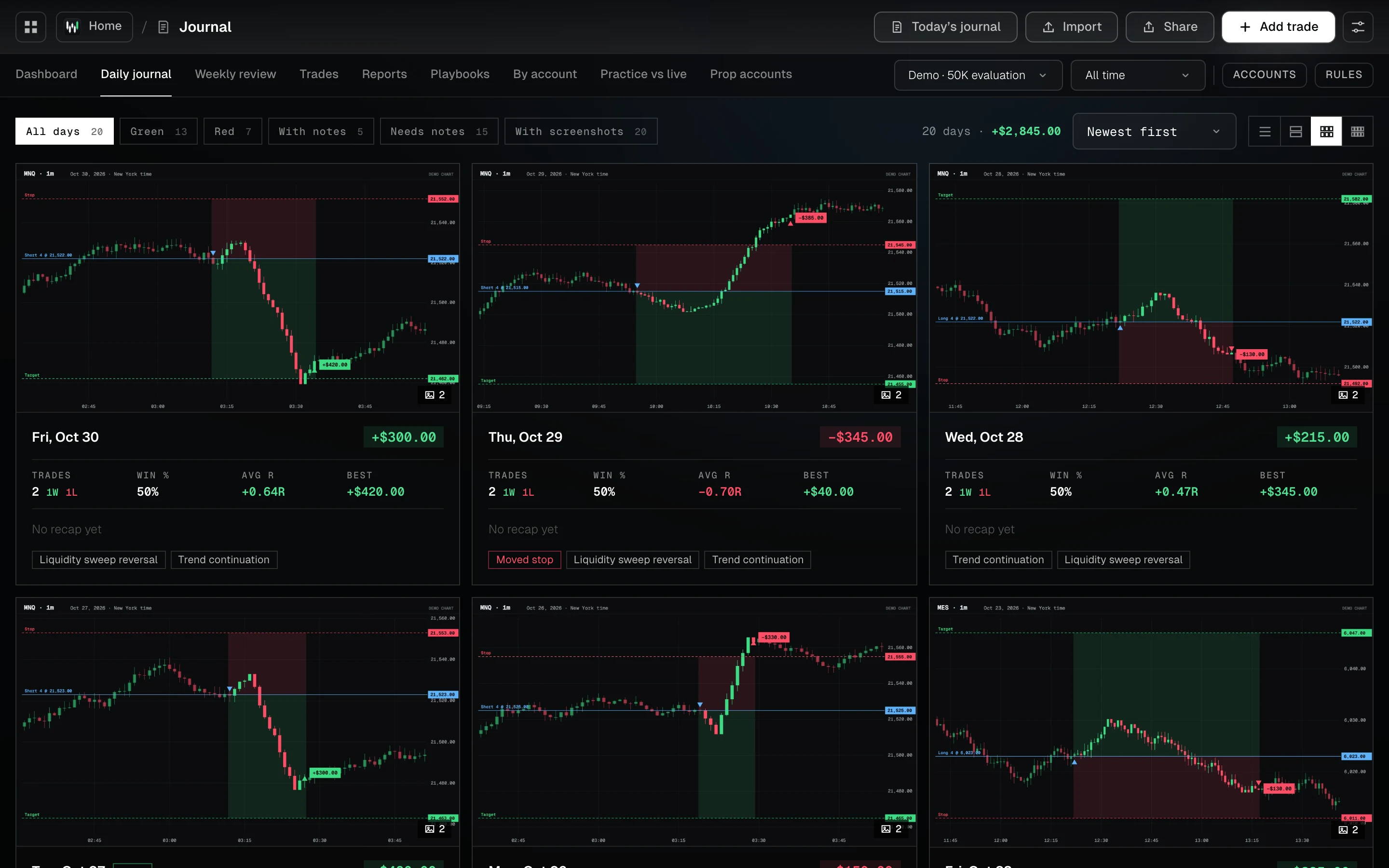
Wickform’s trading journal is where every trade lands. Import it from your platform or add it by hand, then review it against your playbook: rules followed, a grade, mistakes, emotions and a screenshot. Each trading day gets a plan and a recap, and your own day rules say “Done for today” the moment one is hit.
- 6platforms import, plus any CSV
- 50trades on the free plan
- 0broker logins needed
Every trade in, in under a minute.
Drop in the report your platform already exports. Fills are paired into trades, you see a preview before anything is saved, and importing the same file twice skips the duplicates.
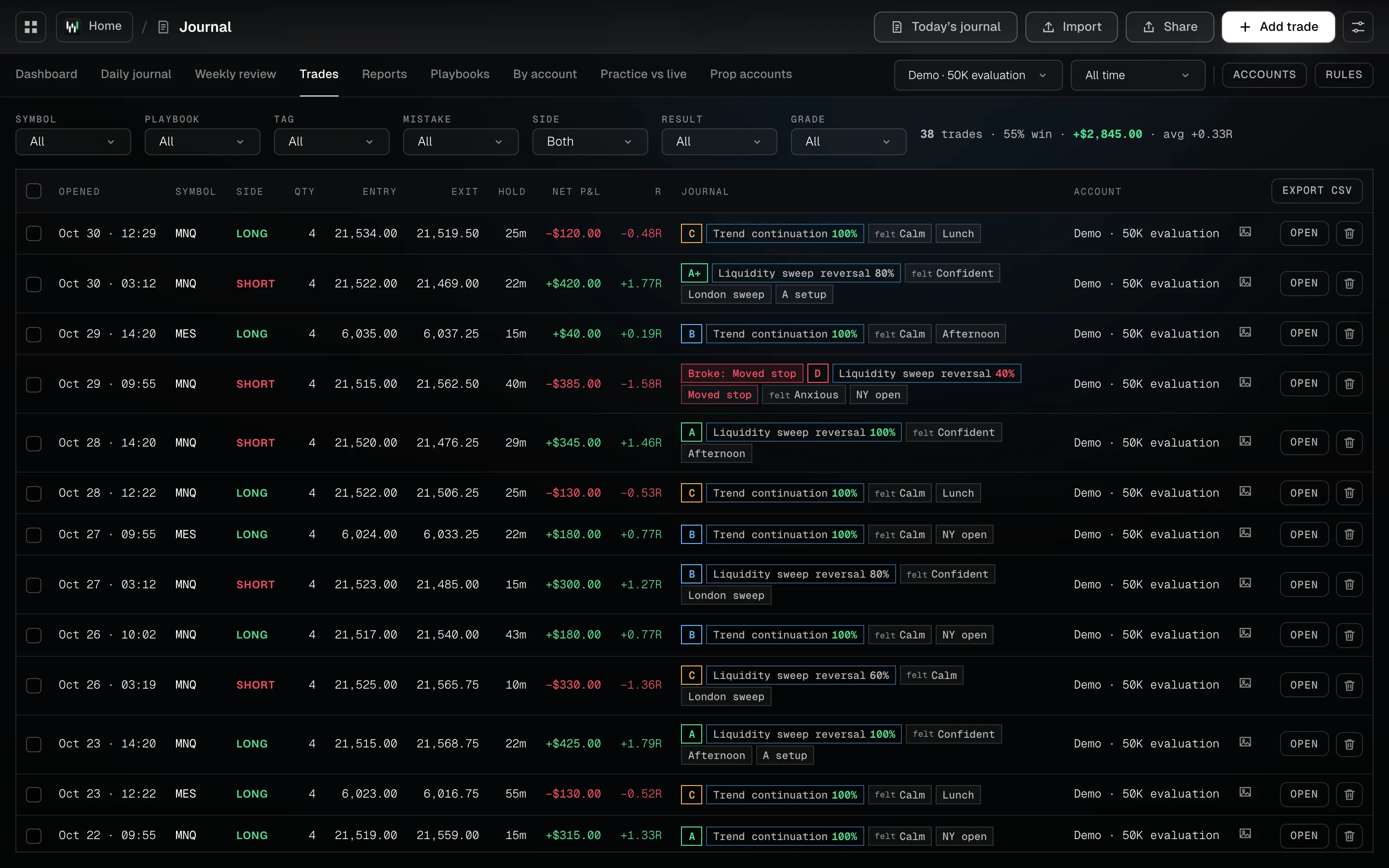
Every trade, with its review beside it
Playbook, grade, rule adherence, emotion and mistakes next to each trade. Filter by symbol, playbook, tag, mistake, side, result or grade.
Six platforms and any CSV
- Tradovate
- NinjaTrader 8
- Rithmic R | Trader Pro
- TopstepX
- Interactive Brokers
- MetaTrader 5
- Any CSV, or add it by hand
Review it while it’s fresh.
Each setup has its own checklist. Tick the rules you followed, grade the trade, tag what went wrong, and see the trade on a chart.
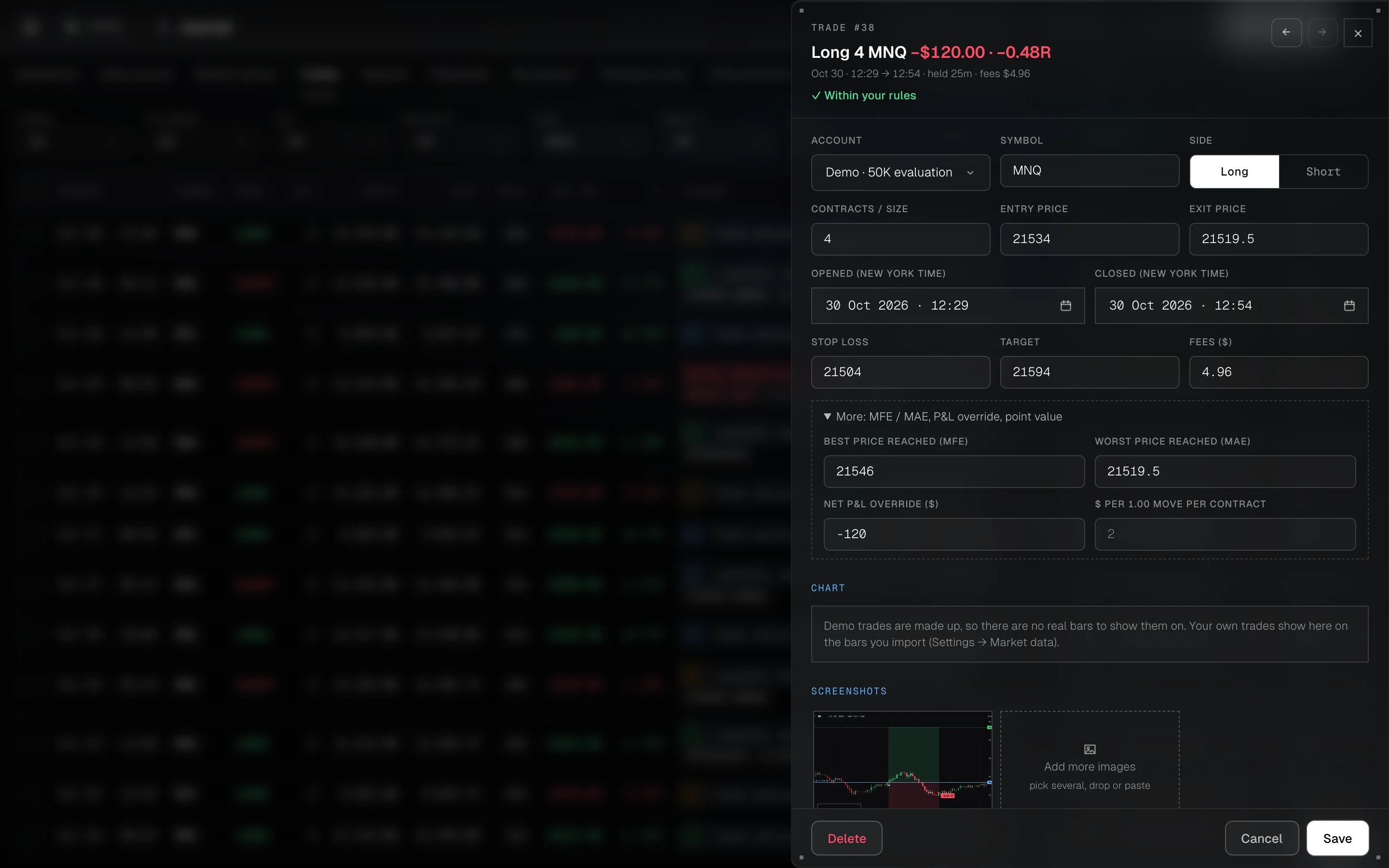
Playbook, grade, mistakes and the chart
Open any trade to edit its fills, stop and target, how far it ran for and against you, its screenshots and its notes.
- Playbook checklist and adherence score
- Grade, confidence, emotion and mistakes
- Screenshots: upload, drag in or paste
- “Replay this trade” from an hour before the entry
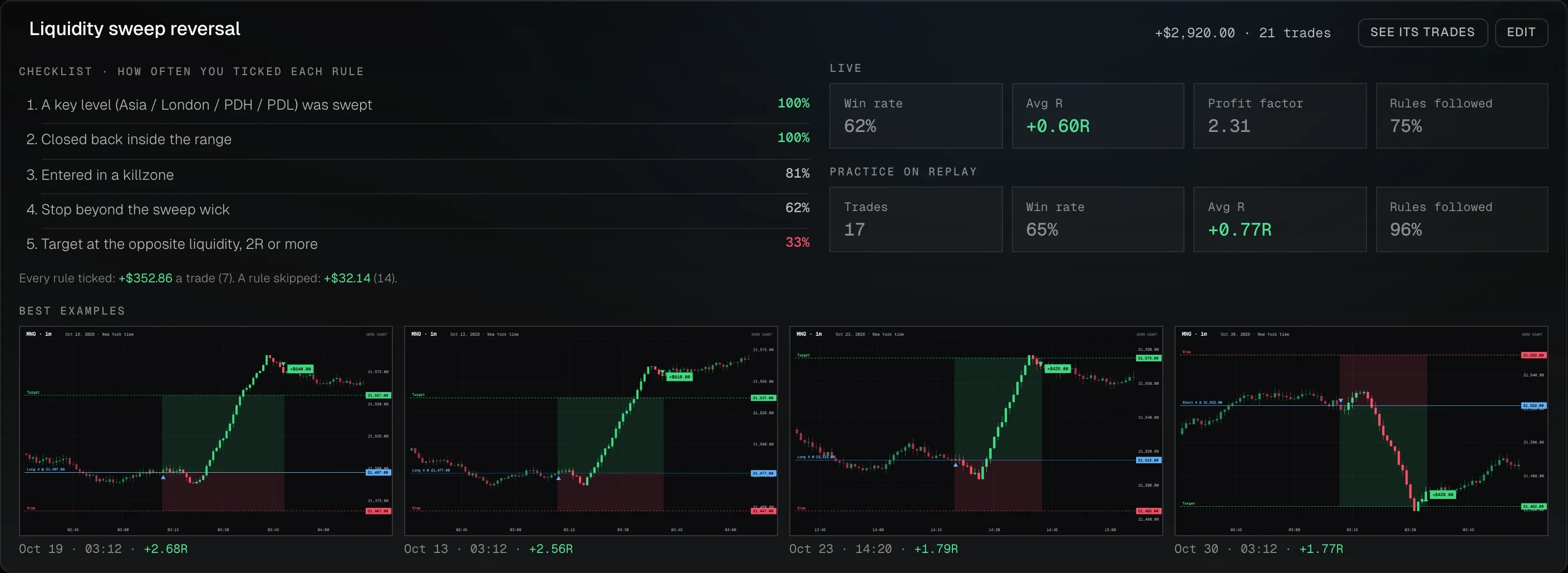
Every setup on one page
Its checklist with how often you actually tick each rule, its results live and on replay side by side, and its best trades as the examples to study before the session.
It tells you when you’re done.
Set your own day rules. Wickform can’t stop you trading, but it says “Done for today” the moment one is hit, marks every trade that breaks one, and shows what breaking them costs.
The cost of a habit, in dollars
P&L with your rules followed next to P&L with a rule broken, a streak of days you kept every rule, and what each broken rule cost.

Your limits, checked on every trade
- Profit stop and loss stop
- Max trades or losses a day
- Markets and size you trade
- Cool-down after a loss
Anything less is a B setup
An A+ checklist for your best setup. A trade that doesn’t tick every box is logged as a B, so you can see what the B trades really make.
Read it before the open
Your plan for the moments that go wrong, written as if / then, shown before the session starts.
One goal for next week.
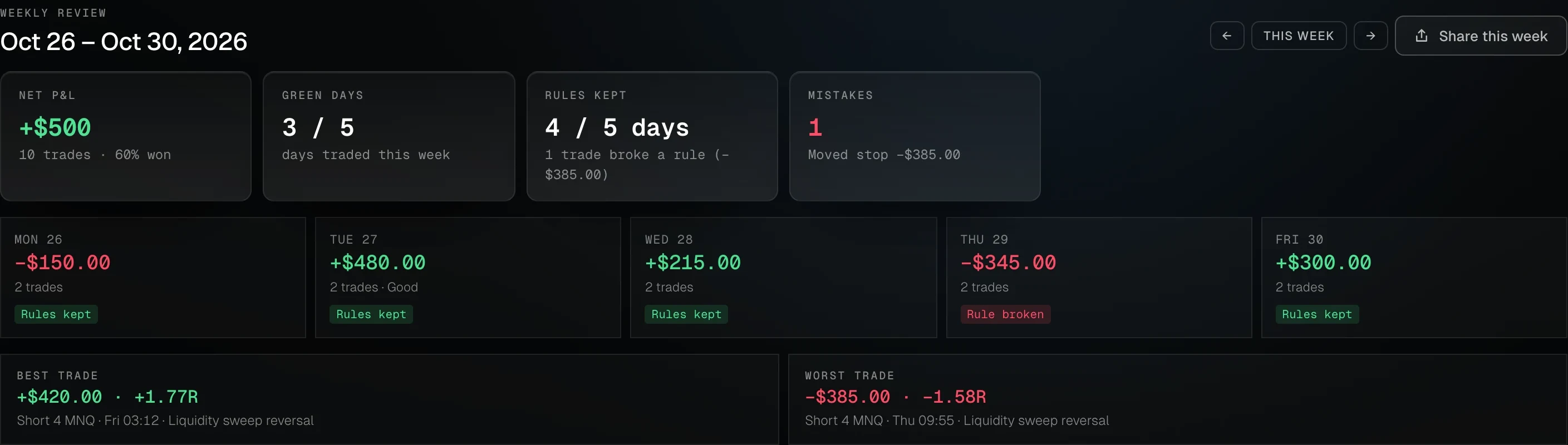
The week’s results and the days you kept your rules, then three questions: what went well, what to fix, and one goal. Next week opens with that goal.
Every day, your best and worst trade, and your review
Share your month, not your account
Turn a month, a week or a prop account into an image for X, Discord or Instagram, in dollars, percent, R or with no amounts at all.
In your browser, backed up to one file
Trades stay in your browser’s own database. One backup file restores everything in any browser, and the app installs and opens offline.
Three steps to start.
Import or add your trades
Drop in the export from Tradovate, NinjaTrader 8, Rithmic, TopstepX, Interactive Brokers or MetaTrader 5, or any CSV of trades or fills.
Review every trade
Pick the playbook, tick the rules you followed, grade it, tag mistakes and emotions, and paste in a screenshot.
Fix one thing a week
The weekly review shows what you kept and what cost you, then asks for one goal for next week.
Short answers, straight from the app.
What should a trading journal track?
Entry and exit, size, P&L in dollars and in R, the setup, whether you followed its rules, and what you felt. Wickform adds the session and hour, how far each trade ran for and against you (MAE / MFE), the dollar cost of each mistake, and the trade on a chart.
How do I import trades from my platform?
Export a report and drop the file in. There’s a step-by-step guide for Tradovate, NinjaTrader, Rithmic, TopstepX, IBKR and MT5.
How does a journal help with discipline?
By making a rule visible at the moment you break it. Wickform marks every trade that breaks one of your day rules and shows rule-followed against rule-broken P&L, so a habit’s cost is a number, not a feeling.
Guides, tools and terms that go with it.
Good to know.
Is the trading journal free?
Yes. The free plan has no card and no trial clock: a journal for 50 trades, imports, the P&L calendar and core stats. Pro and Pro+ remove the limit.
Which platforms can I import trades from?
Tradovate (Performance report or Orders), NinjaTrader 8, Rithmic R | Trader Pro, TopstepX, Interactive Brokers (Flex Query CSV) and MetaTrader 5, plus any CSV with a row per trade or a row per fill. You can also add trades by hand.
Do I have to connect my broker or prop firm account?
No. You import the report your platform already exports, so Wickform never needs your broker or prop-firm login.
Where are my trades stored?
In your browser’s own database, on your device. Nothing is uploaded. A backup is one file with your trades, notes and screenshots that restores in any browser.
Does it work for forex and CFD prop accounts?
Yes. MetaTrader 5 exports import directly, and each journal account can be set up as a prop evaluation or funded account with its own rules.